Improware module WorkflowExtra
De kracht van een workflow (werkstroom) is het afdwingen van een specifieke werkvolgorde. Dit geeft een tijdsbesparing, voorkomt fouten en borgt de kwaliteit of zorgt voor naleving van wet- en regelgeving. De zelf te definiëren workflow van Improware creëert hierin nieuwe mogelijkheden.

Wie doet wat wanneer
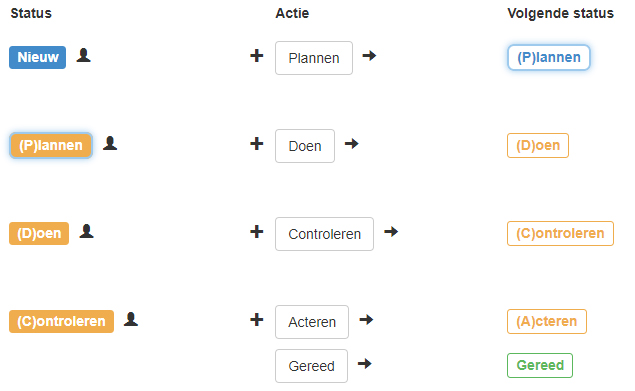
In een workflow worden verschillen statussen onderscheiden. Door een actie ga je naar de volgende status. In de workflow definitie is bepaald wie de actie mag bepalen en wie de actie moet uitvoeren. Dit kan een individu of een team zijn, vooraf vastgesteld of dynamisch gekozen.
Doorlooptijd
De doorlooptijd is een belangrijk element bij een workflow applicatie. Door een voor gedefinieerde volgorde van activiteiten, wil je snel resultaat hebben. Kortom, een beperkte doorlooptijd.
Met de module WorkflowExtra is het mogelijk per status de wachttijd te bewaken en indien nodig te escaleren.
Extra duidelijkheid
Om een workflow binnen de organisatie effectief te benutten, is duidelijkheid belangrijk. Zeker voor de af-en-toe gebruiker. Door een kleurcodering en het geven van een extra toelichting geeft deze module extra mogelijkheden.
Kanbanborden
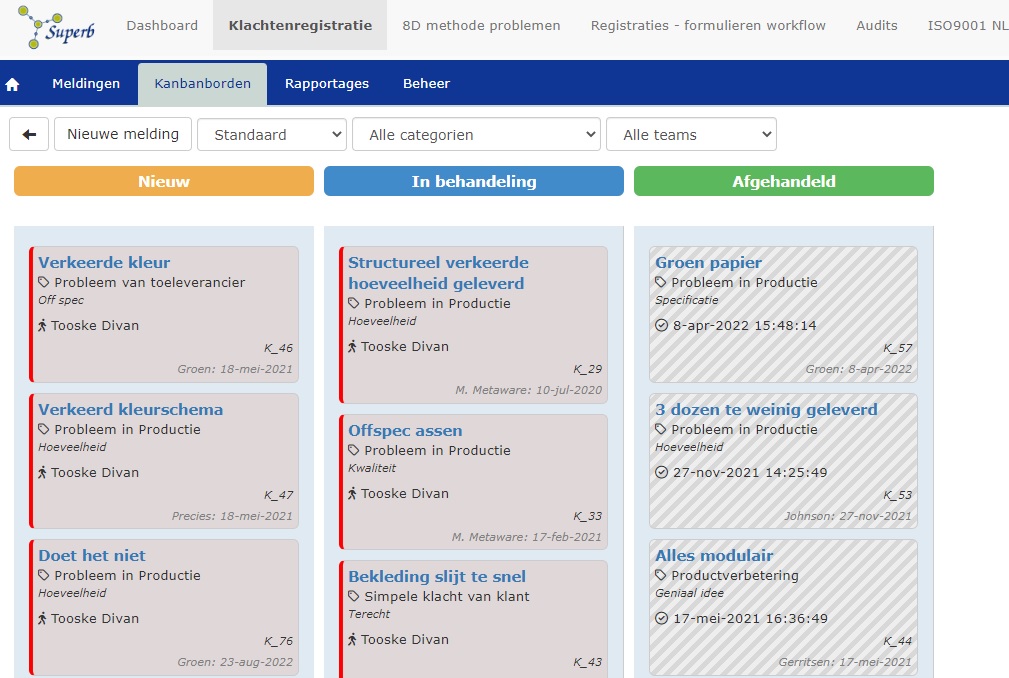
Meer aandacht nodig voor de statussen van alle meldingen, dan zijn kanbanborden handig. In het kanbanbord kunnen meldingen direct naar andere statussen worden gesleept, mits toegestaan binnen de workflow (kolom wordt groen of rood). Diverse filters zijn beschikbaar.
Improware WorkflowExtra in steekwoorden
- Kanban overzichten voor alle meldingen per status
- Tijdsbewaking per status
- Kleurcodering per (soort) status
- Dynamisch doel status toelichten
- Automatische escalatie
Live web demo
In een videobespreking kunnen we je een demonstratie geven van deze Improware+ module. Je krijgt dan een goed beeld van de werking van Improware+ voor het management van klachten en andere afwijkingen en je vragen kunnen direct worden beantwoord. Heb je interesse in een online demo, maak dan gebruik van het contactformulier. Wij kunnen u dan direct een live demo geven of een afspraak maken.