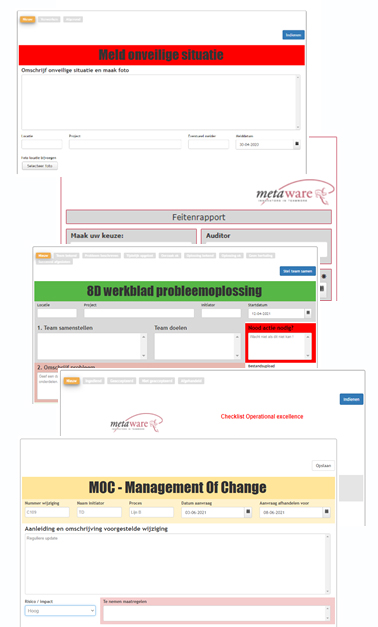
Digitaal formulier maken: eerst de gouden regels dan de software ..
Uit het kenniscentrum van Metaware.
Zoekwoorden: formulier, digitaal formulier, digitale formulieren, webformulier, software formulier, formulieren maken, auditformulier, klachtformulier, klachtenformulier, incident, klacht, moc - management of change, afwijking, werkplek inspectie
Duidelijk digitale formulieren besparen een hoop werk achteraf. Denk bij het succesvol digitale formulieren maken aan de volgende 10 gouden regels:
- Duidelijk doel
Maak de gebruiker duidelijk wat het doel van het formulier is en dat invullen zinvol is. Leg uit wat verwacht wordt en wat met het formulier gaat gebeuren. Voorkom nutteloos ingevulde formulieren. En geeft het formulier natuurlijk een duidelijke titel.
- Relevante en duidelijk vragen
Stel duidelijke, enkelvoudige vragen. Eén ding tegelijk en hou de vragen in het formulier kort en bondig. De vragen zijn natuurlijk relevant voor het doel van het formulier.
- Juiste velden
Pas de juiste velden toe, overeenkomend met de vraag. Markeer verplichte velden met een *. Meerkeuze vragen moeten glashelder zijn. Tekstvakken moeten voldoende ruimte geven. Pas waar nodig datumvelden toe.
- KISS: Keep It Simpel and Stupid
Maak het formulier kort en bondig. Gebruik context gevoelige velden in het formulier zodat de invuller alleen vragen te zien krijgen die op hem van toepassing zijn. Denk aan KISS.
- Toelichting vooraf
Geef de toelichting vooraf. Dit voorkomt foutief invullen van het digitale formulier. Wees in de toelichting zo beknopt en duidelijk mogelijk.
- Foutloos
Formulieren moeten foutloos zijn. Om te zorgen dat ze met zo min mogelijk moeite worden ingevuld en om afhakers te voorkomen. Het gaat vaak om onwetende gebruikers, die voor het eerst het digitale formulier invullen!
- Alledaagse taal
Gebruik alledaagse taal, met uitsluitend nuttige informatie. Kort en leesbaar. Vermijd jargon. Maak het scanbaar.
- Gevecht om de vierkante millimeter
Digitale formulieren worden steeds meer op mobile devices ingevuld; een gevecht om de vierkante millimeter. Zorg ervoor dat ook met een klein invulscherm, het online formulier goed is in te vullen. Gebruik een formulier met responsive design.
- Na verzenden
Maak de gebruiker duidelijk wat er na het verzenden gebeurt met het formulier en ZIJN gegevens. Maak zonodig al in het formulier duidelijk wat de workflow is.
- Test formulieren
Vaak is het onduidelijk tegen welke problemen de gebruiker aanloopt. Test het digitale formulier daarom vooraf.
Na de regels de software.
Deze korte video toont het gebruik van het klachtenmanagement systeem Infoware als cloudoplossing voor de digitale afhandeling van klachten en afwijkingen.
Bekijk voor een uitgebreide uitleg onze productpagina van Infoware, de demo-omgeving van Infoware of probeer het NU (in 60 seconden ..).
En pas dan meteen de gouden regels toe ...
[klik op afbeelding om naar de demo-omgeving te gaan]