AI en kwaliteitsmanagement
AI - Artificial Intelligence en kwaliteitsmanagement, een nieuwe wereld van mogelijkheden. AI, het lijkt zo futoristisch, maar de praktische mogelijkheden voor AI zijn er al. En dan zijn we nog maar bij het begin van AI ...
Het Metaware platform is als 'Lego-stenen' opgebouwd en een daarvan is de documentenbeheer-omgeving. Dit laatste is in feite een kennisdatabank en hier is AI al op toe te passen. Om de gebruiker dmv machine learning sneller en accurater antwoord te geven op zijn vragen.
Concreet voorbeeld van AI. Voor webwinkel Bol en Teleperformance, een wereldwijde business service provider, is Bol's kennisbank BAS, een Metaware platform toepassing, ontsloten naar Microsoft's Azure artificial intelligence. Dit levert een chatbot die de service experts ondersteunen om klanten sneller en effectiever te woord te staan.
Ander voorbeeld. Je wil je kwaliteitsdocumenten beschikbaar hebben in een andere taal. Geen probleem. De brontaal van een kwaliteitsdocument kan online worden vertaald in een willekeurige doeltaal van goede kwaliteit. Zonodig kan dit batchgewijs gebeuren. Ook kan het vertaalmodel LLM - Large Language Model worden getraind met eigen (organisatie)begrippen. Neem contact met ons op voor meer details.
Niet alleen de documentatie, maar ook andere delen van het Metaware platform kunnen ontsloten worden naar een AI-omgeving. Denk aan registraties en rapportages die een beeld geven van de implementatie van het managementsysteem.
Wat betekent dit voor het eigen kwaliteitsmanagementsysteem? Allereerst is het volwassenheidsstadium van belang. De API's zijn er, maar begin aan AI als het volwassenheidsniveau voldoende hoog en bekijk welke functionaliteiten anders nog eerst zijn toe te passen.
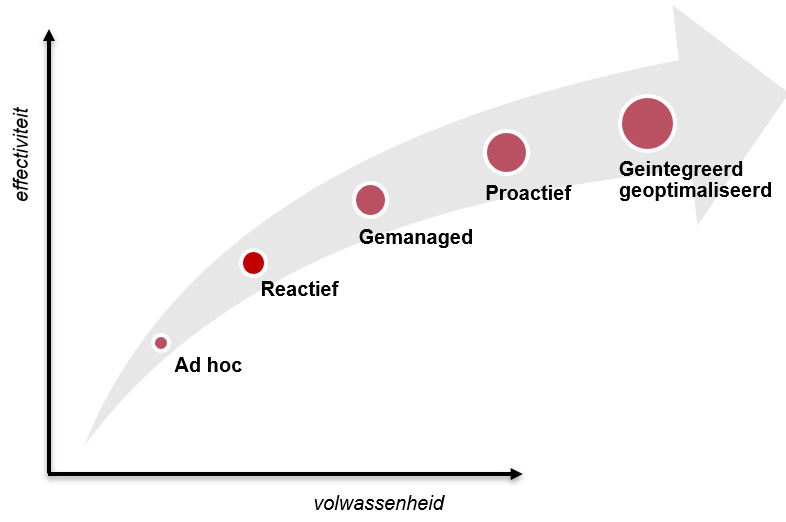
Kwaliteitsmanagementsysteem - de volwassenheidsstadia
Op hoofdlijnen zijn de stadia van een 'handboek' naar een managementsysteem in een aantal stappen te beschrijven:
- Ad hoc
Het begrip van kwaliteitsmanagement is beperkt. De kwaliteitsbeheersing van processen is gefragmenteerd en problemen worden op brede schaal genegeerd. Op kwaliteitsgebied is veel onwetendheid en er heerst een geloof dat alles goed is. Formeel zijn er geen verantwoordelijkheden en verantwoording wordt niet afgelegd. Documentatie van processen en werkwijzen is beperkt en vaak verouderd. Communicatie per mail en toegang tot kwaliteitsdata en -documentatie is moeizaam.
Tooling: Dit stadium zijn we al gepasseerd.
- Reactief
Naast de kwaliteitsmanager zijn slechts een beperkt aantal mensen betrokken bij kwaliteitsmanagement. Kwaliteitsgegevens worden beperkt verzameld, meestal in afzonderlijke spreadsheets. Gebruikers wachten tot problemen zich voordoen en reageren dan pas. Belangrijke kwaliteitsproblemen worden vastgelegd, maar nog onvoldoende geanalyseerd om herhaling te voorkomen. Van integratie is nog geen sprake.
Tooling: Een simpel kwaliteitssysteem voor een beperkt aantal mensen
- Gemanaged
Kwaliteitsmanagement is binnen de gehele organisatie van belang, niet alleen voor de kwaliteitsmanager. Audits en controles worden regelmatig uitgevoerd. KPI's zijn ingevoerd en daar wordt op gestuurd. Eigenaarschap en verantwoordelijkheden zijn vastgesteld.
Tooling: Versiebeheer actief, revisie uitgerold, navigatiestructuren, auditsystematiek, registratie, checklist ISO9001
- Proactief
Kwaliteitsdata zijn organisatie-breed beschikbaar en toegankelijk. Werkwijzen zijn actueel en op een praktische manier vastgelegd en ook weer organisatie-breed toegankelijk. Problemen zijn herkend en worden geanalyseerd. Acties worden vastgesteld en uitgevoerd om herhaling te voorkomen.
Tooling: Monitoring gebruik managementsysteem, rapportages; incident – > problem, 5W’s / 8D, risico-proces, diverse workflows voor checklisten, beoordelingen, goedkeuringen
- Geintegreerd en geoptimaliseerd.
Kwaliteitsmanagement is een speerpunt en een waarde binnen de organisatie. Een volledige procesintegratie ondersteund proactieve, risico-gebaseerde kwaliteitsbeslissingen. Kwaliteitsdata worden onderling gecorreleerd, zonodig met kunstmatige intelligentie. Samenwerking is de sleutel tot succes om positieve bedrijfs- en klantresultaten te bewerken.
Tooling: Geintegreerde omgeving, kennisbank, risico-analyse op relevante plaatsen/activiteiten, risico-caroussel, kwaliteitskalender, FOBO - analyses, dashboards, API's
Functionaliteiten
Een managementsysteem is breed van opzet: de beschrijving van de processen versus de operationele uitvoering. In feite de bekende slogan: 'Zeg wat je doet en doe wat je zegt.' Een managementsysteem is dan ook opgebouwd uit verschillende componenten: het beschrijvende deel met documentmanagement en referenties naar vereiste norm-items, het risico-overzicht inclusief risicobehandelplan en dan alle gerelateerde control processen (afhandeling afwijkingen, audits, klachtenprocedure, check operational excellence, ..).
Een overzicht van 'standaard' functionaliteiten van een volwassen managementsysteem:
| Navigatie / zoeken |
- Index van alle documenten
- Overzichten per functie, proces, norm-item, ..
- Mijn documenten, waar ik iets mee te maken heb
- Laatst door mij geraadpleegd
- Trending documenten binnen de organisatie
- Recent gezocht binnen de organisatie
- ‘Full text search’ met filtering en zoeksuggesties
|
| Workflow sturing |
- Workflowprocessen voor beoordeling, autorisatie, wijziging
- Zelf te definiëren workflow indien nodig
- Leesbevestiging als registratie belangrijk is (bv veiligheidsinstructies)
- Kwaliteitskalender om activiteiten te structuren
|
| Risico gebaseerd |
- Overzicht bedreiging, risico's met classificatie
- Beheersmaatregelen voor risicomitigatie
- Effectiviteitsbeoordeling van operationele maatregelen
|
| Integratie |
- Samenbrengen 'zeg wat je doet' en 'doe wat je zegt'
- Documentatie en registratie in een
- Eén platform als toegang, maar gekoppeld met andere omgevingen
- Toegang vanaf verschillende devices: desktop, tablet, mobiel
|
| Uitbreidbaar |
- Zelf te definiëren formulieren
- Meerdere toepassingen binnen hetzelfde platform
- Basisapplicaties meermalen als bouwstenen in te zetten
- Voor elk werkgebied, activiteit en eigen werkomgeving
- API's voor het ontsluiten of ophalen van data
|
| Monitoring |
- Zelf te definiëren dashboards
- Raadplegingen per document, per type, per periode
- Niet gevonden, maar waar wel op gezocht is
- Nooit gebruikte documenten
- Weten waar naar wordt gekeken
- Zelf te definiëren grafieken
- Gepersonaliseerd widgets
- Zwakheden registreren en specifiek monitoren
|
| Keten / mobiel |
- Voor klanten, die moeten 'meekijken'
- Voor onderaannemers die instructies (verplicht) moeten lezen
- Corporate documenten gezamenlijk gebruiken
- Op de projectlocatie, op je telefoon
- Aan het bed van de client, op je tablet
|
Weten wat een managementsysteem platform kan?
Zet voor de aardigheid als proef in 60 seconden het Metaware platform klaar, softwaretool voor managementsystemen: documentatie, risico-analyse, meldingen, audits, leveranciersbeoordelingen, ... En zoek de verschillen met je huidige werkwijze ...