QMS systeem
Een QMS systeem - Quality Management System opzetten. Waar moet je beginnen bij het opzetten van een QMS systeem en dan nog een QMS systeem dat aantoonbaar en certificeerbaar is. Belangrijk is vooraf vast te stellen wat het niveau van de organisatie is. Als er niks is dan kan het beste simpel worden begonnen. Wat zijn de belangrijke processen en hoe worden deze beheerst. Maak dit aantoonbaar en leg het vast in een managementsysteem. Probeer de ad hoc - aanpak echter achter je te laten. Is een organisatie veel verder in zijn ontwikkeling, dan is het in eerste instantie meer het verzamelen van de aanwezige (proces)beschrijvingen, instructies, spreadsheet-registraties, etc. Dit structureren en vervolgens omvormen tot een solide managementsysteem. Mogelijk is al meer een pro-actieve beheersing mogelijk, maar dan moeten alle systemen goed op elkaar aansluiten.
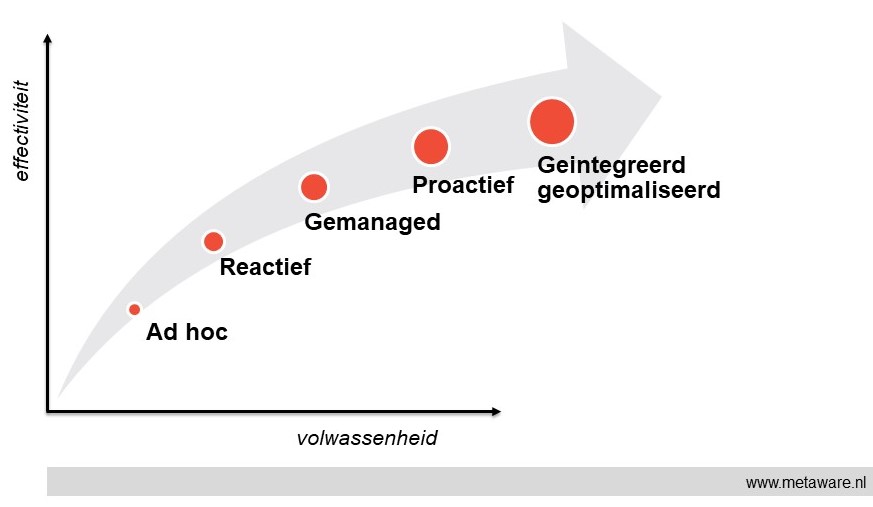
Onderstaand overzicht geeft de volwassenheidsstadia van een QMS systeem. Als duidelijk is waar de eigen organisatie staat, kan makkelijker een plan van aanpak worden opgesteld voor het vervolgtraject.
QMS systeem - de volwassenheidsstadia
Op hoofdlijnen zijn in een QMS systeem de volgende volwassenheidsstadia in een managementsysteem te onderscheiden:
- Ad hoc
Het begrip van management van kwaliteit, milieu, arbo, informatiebeveiliging is beperkt. De beheersing van processen is gefragmenteerd en problemen worden op brede schaal genegeerd. Op kwaliteitsgebied is veel onwetendheid en er heerst een geloof dat alles goed is. Formeel zijn er geen verantwoordelijkheden en verantwoording wordt niet afgelegd. Documentatie van processen en werkwijzen is beperkt en vaak verouderd. Communicatie per mail en toegang tot kwaliteitsdata en -documentatie is moeizaam.
- Reactief
Naast de kwaliteitsmanager (QM) zijn slechts een beperkt aantal mensen betrokken bij kwaliteitsmanagement. Kwaliteitsgegevens worden beperkt verzameld, meestal in afzonderlijke spreadsheets. Gebruikers wachten tot problemen zich voordoen en reageren dan pas. Belangrijke kwaliteitsproblemen worden vastgelegd, maar nog onvoldoende geanalyseerd om herhaling te voorkomen. Van integratie is nog geen sprake.
- Gemanaged
Management van kwaliteit, milieu, arbo, informatiebeveiliging is binnen de gehele organisatie van belang, niet alleen voor de kwaliteitsmanager. Audits en controles worden regelmatig uitgevoerd. KPI's zijn ingevoerd en daar wordt op gestuurd. Eigenaarschap en verantwoordelijkheden zijn vastgesteld.
- Proactief
Data omtrent kwaliteit, milieu, arbo, informatiebeveiliging zijn organisatie-breed beschikbaar en toegankelijk. Werkwijzen zijn actueel en op een praktische manier vastgelegd en ook weer organisatie-breed toegankelijk. Problemen zijn herkend en worden geanalyseerd. Acties worden vastgesteld en uitgevoerd om herhaling te voorkomen.
- Geintegreerd en geoptimaliseerd.
Management van kwaliteit, milieu, arbo, informatiebeveiliging is een speerpunt en een waarde binnen de organisatie. Een volledige procesintegratie ondersteund proactieve, risico-gebaseerde kwaliteitsbeslissingen. Kwaliteitsdata worden onderling gecorreleerd, zonodig met kunstmatige intelligentie. Samenwerking is de sleutel tot succes om positieve bedrijfs- en klantresultaten te bewerken.
QMS systeem - wat gebruiken bij het opzetten
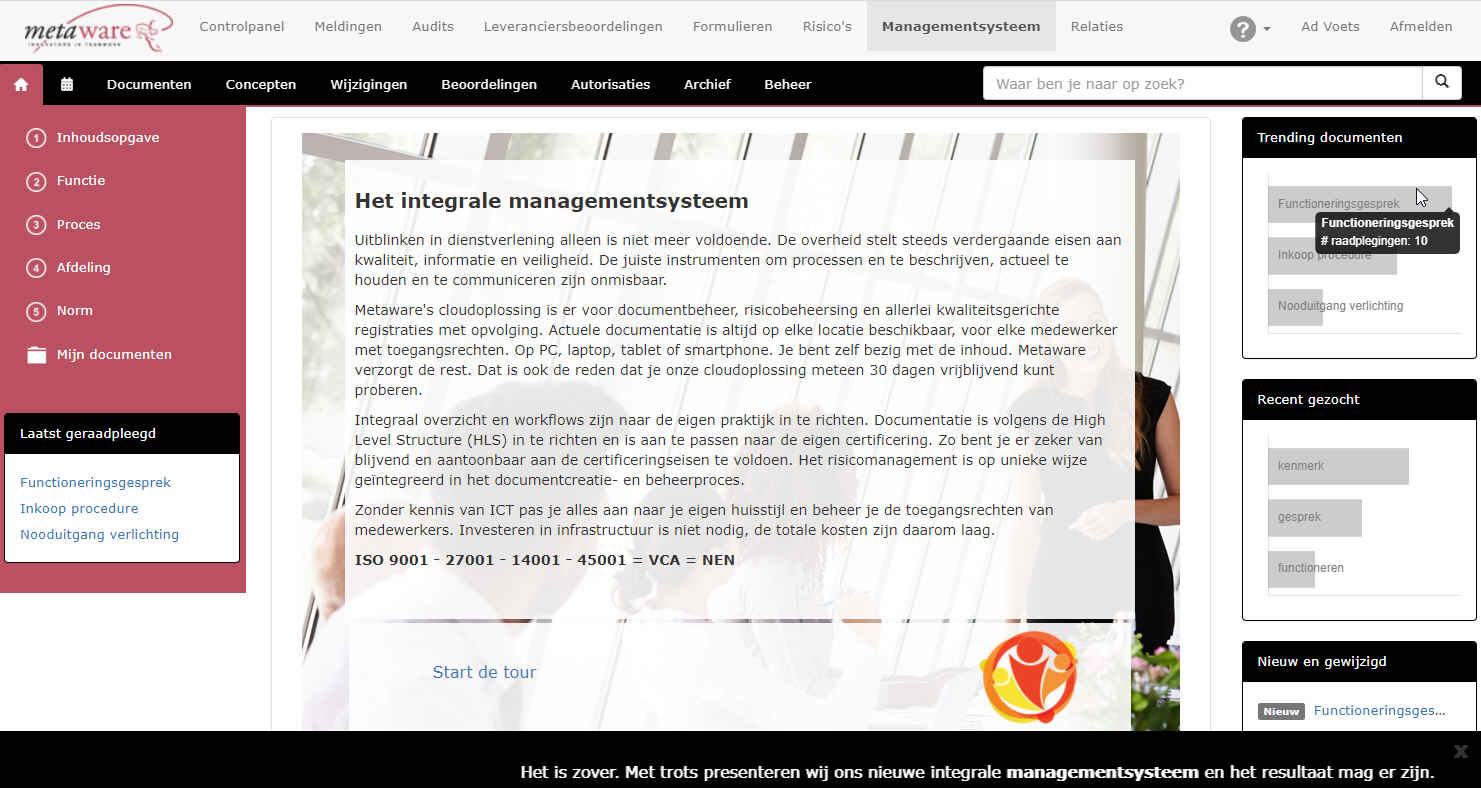
Aan de IT-kant gaan de ontwikkelingen misschien wel nog sneller dan in certificatieland: mobiel werken, sociale managementsystemen, meteen uit de cloud. Toch heel iets anders dan de verzameling procesbeschrijvingen, procedures, instructies en formulieren. Geprint en gebundeld in het handboek in de kast bij elke afdelingsmanager….Een digitaal management systeem kan zoveel meer, los van de verschillende 'ISO normen'.
Een overzicht van 'standaard' functionaliteiten van een volwassen managementsysteem:
| Navigatie / zoeken |
- Index van alle documenten
- Overzichten per functie, proces, norm-item, ..
- Mijn documenten, waar ik iets mee te maken heb
- Laatst door mij geraadpleegd
- Trending documenten binnen de organisatie
- Recent gezocht binnen de organisatie
- ‘Full text search’
|
| Workflow sturing |
- Workflowprocessen voor beoordeling, autorisatie, wijziging
- Zelf te definiëren workflow indien nodig
- Leesbevestiging als registratie belangrijk is (bv veiligheidsinstructies)
- Kwaliteitskalender om activiteiten te structuren
|
| Integratie |
- Samenbrengen 'zeg wat je doet' en 'doe wat je zegt'
- Documentatie en registratie in een
- Eén platform als toegang, maar gekoppeld met andere omgevingen
- Toegang vanaf verschillende devices: desktop, tablet, mobiel
|
| Uitbreidbaar |
- Zelf te definiëren formulieren
- Meerdere toepassingen binnen hetzelfde platform
- Voor elk werkgebied, activiteit en eigen werkomgeving
|
| Monitoring |
- Raadplegingen per document, per type, per periode
- Niet gevonden, maar waar wel op gezocht is
- Nooit gebruikte documenten
- Weten waar naar wordt gekeken
- Zwakheden registreren en specifiek monitoren
|
| Keten / mobiel |
- Voor klanten, die moeten 'meekijken'
- Voor onderaannemers die instructies (verplicht) moeten lezen
- Corporate documenten gezamenlijk gebruiken
- Op de projectlocatie, op je telefoon
- Aan het bed van de client, op je tablet
|
Zet voor de aardigheid als proef in 60 seconden onze cloudoplossing klaar, softwaretool voor managementsystemen: documentatie, risico-analyse, meldingen, audits, leveranciersbeoordelingen, ... En zoek de verschillen met je huidige werkwijze ...